| ISO Language Names | Set 1 | Set 2 | Set 3 | Endonym(s) | Other Name(s) [note 1] |
Notes | |
| T | B | ||||||
| Abkhazian | ab | abk | abk | Аҧсуа; Apsua; აფსუა | Abkhaz | ||
| Afar | aa | aar | aar | Qafar af | |||
| Afrikaans | af | afr | afr | Afrikaans | |||
| Akan | ak | aka | aka + 2 | Ákán | Twi is tw/twi, Fanti is fat | ||
| Albanian | sq | sqi | alb | sqi + 4 | Shqip | called "Albanian Phylozone" in 639-6 | |
| Amharic | am | amh | amh | አማርኛ (Amarəñña) | |||
| Arabic | ar | ara | ara + 28 | اَلْعَرَبِيَّةُ (al-ʿarabiyyah) |
Standard Arabic is arb | ||
| Aragonese | an | arg | arg | Aragonés | |||
| Armenian | hy | hye | arm | hye | Հայերեն (Hayeren) | ISO 639-3 code hye is for Eastern Armenian, hyw is for Western Armenian, and xcl is for Classical Armenian | |
| Assamese | as | asm | asm | অসমীয়া (Ôxômiya) | Asamiya | ||
| Avaric | av | ava | ava | Авар мацӏ; اوار ماض (Avar maz) | Avar | ||
| Avestan | ae | ave | ave | Upastawakaēna | |||
| Aymara | ay | aym | aym + 2 | Aymara | Aymaran | ||
| Azerbaijani | az | aze | aze + 2 | Azərbaycan dili; آذربایجان دیلی; Азәрбајҹан дили | Azeri | ||
| Bambara | bm | bam | bam | بَمَنَنكَن ;ߓߡߊߣߊ߲ߞߊ߲ (Bamanankan) | Bamana; Bamanankan | ||
| Bashkir | ba | bak | bak | Башҡорт теле; Başqort tele | Bashkort | ||
| Basque | eu | eus | baq | eus | Euskara/Euskera | ||
| Belarusian | be | bel | bel | Беларуская мова (Biełaruskaja mova) | |||
| Bengali | bn | ben | ben | বাংলা (Bāŋlā) | Bangla | ||
| Bislama | bi | bis | bis | Bislama | Language formed from English and Vanuatuan languages, with some French influence. | ||
| Bosnian | bs | bos | bos | Босански (Bosanski) | Bosniak | Member language of Serbo-Croatian with code sh deprecated in 2000 | |
| Breton | br | bre | bre | Brezhoneg | |||
| Bulgarian | bg | bul | bul | Български (Bulgarski) | |||
| Burmese | my | mya | bur | mya | မြန်မာစာ (Mrãmācā) | Myanmar | |
| Catalan, Valencian | ca | cat | cat | Català; Valencià | |||
| Central Khmer | km | khm | khm | ខេមរភាសា; (Khémôrôphéasa) | Khmer; Cambodian | ||
| Chamorro | ch | cha | cha | Finu' Chamoru | |||
| Chechen | ce | che | che | Нохчийн мотт; (Noxçiyn mott) |
Chechnyan; Chechnian | ||
| Chichewa, Chewa, Nyanja | ny | nya | nya | Chichewa; Chinyanja | |||
| Chinese | zh | zho | chi | zho + 19 | 中文 (Zhōngwén) 汉语; 漢語 (Hànyǔ) |
||
| Church Slavonic, Old Slavonic, Old Church Slavonic | cu | chu | chu | Славе́нскїй ѧ҆зы́къ | In use by the Eastern Orthodox Church | ||
| Chuvash | cv | chv | chv | Чӑвашла (Çăvaşla) | |||
| Cornish | kw | cor | cor | Kernowek | |||
| Corsican | co | cos | cos | Corsu | |||
| Cree | cr | cre | cre + 6 | ᓀᐦᐃᔭᐁᐧᐃᐧᐣ (Nehiyawewin) | |||
| Croatian | hr | hrv | hrv | Hrvatski | Crovatian | Member language of Serbo-Croatian with code sh deprecated in 2000 | |
| Czech | cs | ces | cze | ces | Čeština | Czechian | |
| Danish | da | dan | dan | Dansk | |||
| Divehi, Dhivehi, Maldivian | dv | div | div | ދިވެހި (Dhivehi) | |||
| Dutch, Flemish | nl | nld | dut | nld | Nederlands | Flemish is not to be confused with the closely related West Flemish which is referred to as "Vlaams" and has the code vls in ISO 639-3 | |
| Dzongkha | dz | dzo | dzo | རྫོང་ཁ་ (Dzongkha) | Bhutanese | ||
| English | en | eng | eng | English | |||
| Esperanto | eo | epo | epo | Esperanto | |||
| Estonian | et | est | est + 2 | Eesti keel | |||
| Ewe | ee | ewe | ewe | Èʋegbe | |||
| Faroese | fo | fao | fao | Føroyskt | Faeroese | ||
| Fijian | fj | fij | fij | Na Vosa Vakaviti | |||
| Finnish | fi | fin | fin | Suomi | |||
| French | fr | fra | fre | fra | Français | ||
| Fulah | ff | ful | ful + 9 | 𞤊𞤵𞤤𞤬𞤵𞤤𞤣𞤫 ;ࢻُلْࢻُلْدٜ; Fulfulde 𞤆𞤵𞤤𞤢𞥄𞤪 ;ݒُلَارْ; Pulaar |
Fula; Fulani | ||
| Gaelic, Scottish Gaelic | gd | gla | gla | Gàidhlig | Scots Gaelic | ||
| Galician | gl | glg | glg | Galego | Galego | ||
| Ganda | lg | lug | lug | Luganda | Luganda | ||
| Georgian | ka | kat | geo | kat | ქართული (Kharthuli) | ||
| German | de | deu | ger | deu | Deutsch | ||
| Greek, Modern (1453–) | el | ell | gre | ell | Νέα Ελληνικά; (Néa Ellêniká) | for Ancient Greek, use the ISO 639-3 code grc | |
| Guarani | gn | grn | grn + 5 | Avañe'ẽ | |||
| Gujarati | gu | guj | guj | ગુજરાતી (Gujarātī) | |||
| Haitian, Haitian Creole | ht | hat | hat | Kreyòl ayisyen | |||
| Hausa | ha | hau | hau | هَرْشٜن هَوْس (halshen Hausa) | Hausan | ||
| Hebrew | he | heb | heb | עברית (Ivrit) | Modern Hebrew. Code changed in 1989 from original ISO 639:1988, iw.[3] | ||
| Herero | hz | her | her | Otjiherero | Otjiherero | ||
| Hindi | hi | hin | hin | हिन्दी (Hindī) | |||
| Hiri Motu | ho | hmo | hmo | Hiri Motu | Police Motu; Pidgin Motu | ||
| Hungarian | hu | hun | hun | Magyar nyelv | Magyar | ||
| Icelandic | is | isl | ice | isl | Íslenska | ||
| Ido | io | ido | ido | Ido | |||
| Igbo | ig | ibo | ibo | ásụ̀sụ́ Ìgbò | |||
| Indonesian | id | ind | ind | bahasa Indonesia | covered by macrolanguage ms/msa. Changed in 1989 from original ISO 639:1988, in.[3] | ||
| Interlingua (International Auxiliary Language Association) | ia | ina | ina | Interlingua | |||
| Interlingue, Occidental | ie | ile | ile | Interlingue; Occidental | |||
| Inuktitut | iu | iku | iku + 2 | ᐃᓄᒃᑎᑐᑦ (Inuktitut) | |||
| Inupiaq | ik | ipk | ipk + 2 | Iñupiaq | Inupiat; Inupiatun | ||
| Irish | ga | gle | gle | Gaeilge | Irish Gaelic | ||
| Italian | it | ita | ita | Italiano | |||
| Japanese | ja | jpn | jpn | 日本語 (Nihongo) | |||
| Javanese | jv | jav | jav | ꦧꦱꦗꦮ; basa Jawa | |||
| Kalaallisut, Greenlandic | kl | kal | kal | Kalaallisut | |||
| Kannada | kn | kan | kan | ಕನ್ನಡ (Kannađa) | Kannadan; Canarese | ||
| Kanuri | kr | kau | kau + 3 | كَنُرِيِه; Kànùrí | |||
| Kashmiri | ks | kas | kas | कॉशुर; كأشُر (Kosher) | Koshur | ||
| Kazakh | kk | kaz | kaz | Қазақша; Qazaqşa; قازاقشا | Qazaq | ||
| Kikuyu, Gikuyu | ki | kik | kik | Gĩgĩkũyũ | |||
| Kinyarwanda | rw | kin | kin | Ikinyarwanda | Rwandan; Rwanda; Ikinyarwanda | ||
| Komi | kv | kom | kom + 2 | Коми кыв | Zyran; Zyrian; Komi-Zyryan | ||
| Kongo | kg | kon | kon + 3 | Kikongo | Kikongo | ||
| Korean | ko | kor | kor | 한국어 (Hangugeo) 조선말 (Chosŏnmal) |
|||
| Kuanyama, Kwanyama | kj | kua | kua | Oshikwanyama | Cuanhama; Oshikwanyama | ||
| Kurdish | ku | kur | kur + 3 | کوردی; Kurdî | |||
| Kyrgyz, Kirghiz | ky | kir | kir | Кыргыз; قىرعىز |
|||
| Lao | lo | lao | lao | ພາສາລາວ (phasa Lao) | Laotian | ||
| Latin | la | lat | lat | Latinum | In use by several Christian organization of churches, and for sciences | ||
| Latvian | lv | lav | lav + 2 | Latviski | Lettish | ||
| Limburgan, Limburger, Limburgish | li | lim | lim | Lèmburgs | |||
| Lingala | ln | lin | lin | Lingála | Ngala | ||
| Lithuanian | lt | lit | lit | Lietuvių | |||
| Luba-Katanga | lu | lub | lub | Kiluba | Luba-Shaba | ||
| Luxembourgish, Letzeburgesch | lb | ltz | ltz | Lëtzebuergesch | Luxembourgian | ||
| Macedonian | mk | mkd | mac | mkd | Македонски (Makedonski) | ||
| Malagasy | mg | mlg | mlg + 11 | مَلَغَسِ; Malagasy | |||
| Malay | ms | msa | may | msa + 36 | بهاس ملايو (bahasa Melayu) | Standard Malay is zsm, Indonesian is id/ind | |
| Malayalam | ml | mal | mal | മലയാളം (Malayāļã) | |||
| Maltese | mt | mlt | mlt | Malti | |||
| Manx | gv | glv | glv | Gaelg; Gailck | Manx Gaelic | ||
| Maori | mi | mri | mao | mri | reo Māori | ||
| Marathi | mr | mar | mar | मराठी (Marāṭhī) | Maharashtran | ||
| Marshallese | mh | mah | mah | kajin M̧ajeļ | Ebon | ||
| Mongolian | mn | mon | mon + 2 | ᠮᠣᠩᠭᠣᠯ ᠬᠡᠯᠡ; Монгол хэл (Mongol xel) |
Mongol | ||
| Nauru | na | nau | nau | dorerin Naoe | Nauruan | ||
| Navajo, Navaho | nv | nav | nav | Diné bizaad; Naabeehó bizaad | |||
| Ndonga | ng | ndo | ndo | Ndonga | Oshindonga | ||
| Nepali | ne | nep | nep + 2 | नेपाली भाषा (Nepālī bhāśā) | Nepalese; Gorkhali | ||
| North Ndebele | nd | nde | nde | isiNdebele; saseNyakatho; Mthwakazi Ndebele | Northern Ndebele | ||
| Northern Sami | se | sme | sme | Davvisámegiella | North Sami | ||
| Norwegian | no | nor | nor + 2 | Norsk | Bokmål is nb/nob, Nynorsk is nn/nno | ||
| Norwegian Bokmål | nb | nob | nob | Norsk Bokmål | covered by macrolanguage no/nor | ||
| Norwegian Nynorsk | nn | nno | nno | Norsk Nynorsk | covered by macrolanguage no/nor | ||
| Occitan | oc | oci | oci | Occitan; Provençal | Provential; Provencal | ||
| Ojibwa | oj | oji | oji + 7 | ᐊᓂᔑᓈᐯᒧᐎᓐ (Anishinaabemowin) | Ojibwe; Ojibway; Otchipwe; Ojibwemowin | ||
| Oriya | or | ori | ori + 2 | ଓଡ଼ିଆ (Odia) | Odian; Odishan; Orissan | ||
| Oromo | om | orm | orm + 4 | afaan Oromoo | Oromoo | ||
| Ossetian, Ossetic | os | oss | oss | ирон Ӕвзаг (iron Ævzag) |
Ossete | ||
| Pali | pi | pli | pli | Pāli | Pali-Magadhi | ||
| Pashto, Pushto | ps | pus | pus + 3 | پښتو (Pax̌tow) | |||
| Persian | fa | fas | per | fas + 2 | فارسی (Fārsiy) | Farsi | |
| Polish | pl | pol | pol | Polski | |||
| Portuguese | pt | por | por | Português | |||
| Punjabi, Panjabi | pa | pan | pan | ਪੰਜਾਬੀ; پنجابی (Pãjābī) | |||
| Quechua | qu | que | que + 43 | Runa simi; kichwa simi; Nuna shimi | Quechuan | ||
| Romanian, Moldavian, Moldovan | ro | ron | rum | ron | Română; Ромынэ | the identifiers mo and mol for Moldavian are deprecated. They will not be assigned to different items, and recordings using these identifiers will not be invalid. | |
| Romansh | rm | roh | roh | Rumantsch; Rumàntsch; Romauntsch; Romontsch | Romansch | ||
| Rundi | rn | run | run | Ikirundi | Kirundi | ||
| Russian | ru | rus | rus | Русский язык (Russkiĭ âzyk) | |||
| Samoan | sm | smo | smo | gagana Sāmoa | |||
| Sango | sg | sag | sag | yângâ tî Sängö | Sangoic | ||
| Sanskrit | sa | san | san + 2 | संस्कृतम् (Saṃskṛtam) | In use by some Indian states on judicial purposes | ||
| Sardinian | sc | srd | srd + 4 | Sardu | Sard | ||
| Serbian | sr | srp | srp | Српски (Srpski) | Member language of Serbo-Croatian with code sh deprecated in 2000, the ISO 639-2/T code srp deprecated the ISO 639-2/B code scc[4] | ||
| Shona | sn | sna | sna | chiShona | |||
| Sichuan Yi, Nuosu | ii | iii | iii | ꆈꌠꉙ (Nuosuhxop) | Northern Yi; Liangshan Yi; Nosu | standard form of the Yi languages | |
| Sindhi | sd | snd | snd | سنڌي; सिन्धी (Sindhī) | |||
| Sinhala, Sinhalese | si | sin | sin | සිංහල (Siṁhala) | |||
| Slovak | sk | slk | slo | slk | Slovenčina | Slovakian | |
| Slovenian | sl | slv | slv | Slovenščina | Slovene | ||
| Somali | so | som | som | Soomaali; 𐒈𐒝𐒑𐒛𐒐𐒘; سٝومالِ | Somalian | ||
| South Ndebele | nr | nbl | nbl | isiNdebele; sakwaNdzundza | Southern Ndebele | ||
| Southern Sotho | st | sot | sot | Sesotho | Sesotho; Sotho | ||
| Spanish, Castilian | es | spa | spa | Español; Castellano | |||
| Sundanese | su | sun | sun | basa Sunda; ᮘᮞ ᮞᮥᮔ᮪ᮓ; بَاسَا سُوْندَا | |||
| Swahili | sw | swa | swa + 2 | Kiswahili; كِسوَحِيلِ | Kiswahili | ||
| Swati | ss | ssw | ssw | siSwati | Swazi | ||
| Swedish | sv | swe | swe | Svenska | |||
| Tagalog | tl | tgl | tgl | Wikang Tagalog | note: Filipino (Pilipino) has the code fil | ||
| Tahitian | ty | tah | tah | reo Tahiti | One of the Reo Mā`ohi (languages of French Polynesia)[5] | ||
| Tajik | tg | tgk | tgk | Тоҷикӣ (Tojikī) | Tajiki | ||
| Tamil | ta | tam | tam | தமிழ் (Tamiḻ) | Thamizh | ||
| Tatar | tt | tat | tat | Татар теле; Tatar tele; تاتار تئلئ |
|||
| Telugu | te | tel | tel | తెలుగు (Telugu) | |||
| Thai | th | tha | tha | ภาษาไทย (Phasa Thai) | Central Thai; Siamese | ||
| Tibetan | bo | bod | tib | bod | བོད་སྐད་ (Bodskad); ལྷ་སའི་སྐད་ (Lhas'iskad) |
Standard Tibetan; Lhasa Tibetan | |
| Tigrinya | ti | tir | tir | ትግርኛ (Təgrəñña) | Tigrigna | ||
| Tonga (Tonga Islands) | to | ton | ton | lea faka-Tonga | Tongan | ||
| Tsonga | ts | tso | tso | Xitsonga | Xitsonga | ||
| Tswana | tn | tsn | tsn | Setswana | Setswana; Sechuana | ||
| Turkish | tr | tur | tur | Türkçe | |||
| Turkmen | tk | tuk | tuk | Türkmençe; Түркменче; تۆرکمنچه |
|||
| Twi | tw | twi | twi | Twi | covered by macrolanguage ak/aka | ||
| Uighur, Uyghur | ug | uig | uig | ئۇيغۇر تىلى; Уйғур тили; Uyƣur tili |
|||
| Ukrainian | uk | ukr | ukr | Українська (Ukraїnska) | |||
| Urdu | ur | urd | urd | اُردُو (Urduw) | |||
| Uzbek | uz | uzb | uzb + 2 | Ózbekça; ўзбекча; ئوزبېچه |
|||
| Venda | ve | ven | ven | Tshivenḓa | Tshivenda | ||
| Vietnamese | vi | vie | vie | tiếng Việt | |||
| Volapük | vo | vol | vol | Volapük | |||
| Walloon | wa | wln | wln | Walon | |||
| Welsh | cy | cym | wel | cym | Cymraeg | ||
| Western Frisian | fy | fry | fry | Frysk | West Frisian; Frisian; Fries |
||
| Wolof | wo | wol | wol | وࣷلࣷفْ | |||
| Xhosa | xh | xho | xho | isiXhosa | Xosa | ||
| Yiddish | yi | yid | yid + 2 | ייִדיש (Yidiš) | Judeo-German | Changed in 1989 from original ISO 639:1988, ji.[3] | |
| Yoruba | yo | yor | yor | èdè Yorùbá | |||
| Zhuang, Chuang | za | zha | zha + 16 | 話僮 (Vahcuengh) | |||
| Zulu | zu | zul | zul | isiZulu | |||

OPUS-CAT can be used in different Wordfast CAT tools by using the Custom MT functionality offered by these products. NOTE: Make sure you use latest version of OPUS-CAT MT Engine with Wordfast. Earlier versions of OPUS-CAT MT Engine required extra configuration to enable it to be used with Wordfast.
Installing the OPUS-CAT MT Engine
- Download the OPUS-CAT MT Engine and install it to your computer by extracting it in a folder on your computer. IMPORTANT: OPUS-CAT MT Engine generates the machine translation, and all OPUS-CAT plugins require that the OPUS-CAT MT Engine is installed on the same computer and running when the plugins are used.
- Start the OPUS-CAT MT Engine application by clicking OpusCatMTEngine.exe in the extraction folder (note that the file extension .exe may be hidden in Windows Explorer, in that case the file is shown as OpusCatMTEngine).
- Install models from the OPUS model repository for the language pairs that you require.
- After the model has been downloaded and installed, test that it works.
Using OPUS-CAT in Wordfast Pro
- Make sure that OPUS-CAT MT Engine is running.
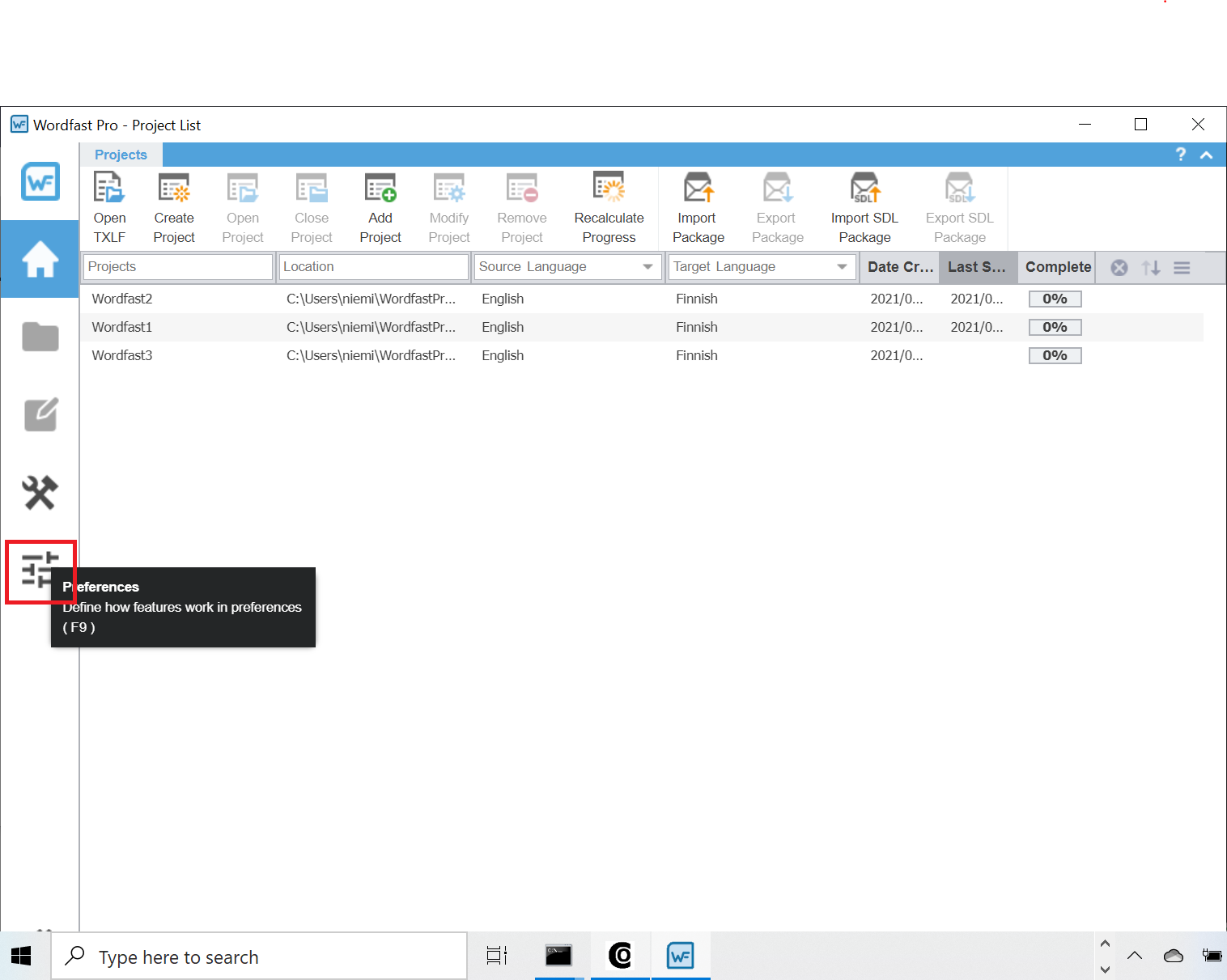
- Click the Preferences icon in the Wordfast Pro UI:
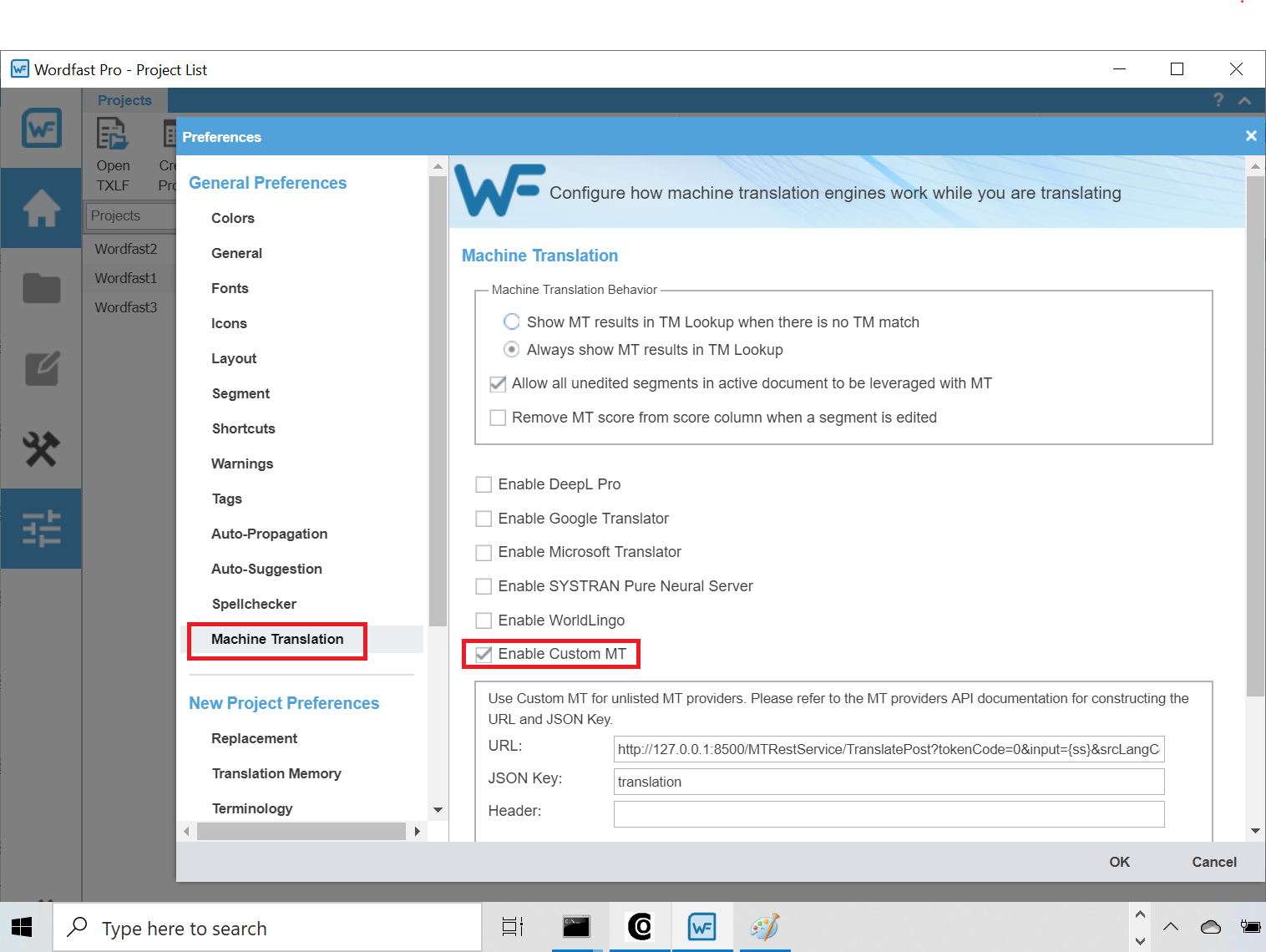
- Select Machine translation from the left and check the Enable Custom MT checkbox:
- Enter the URL for accessing the HTTP API of OPUS-CAT MT Engine into the URL field, and enter translation into the JSON Key field:
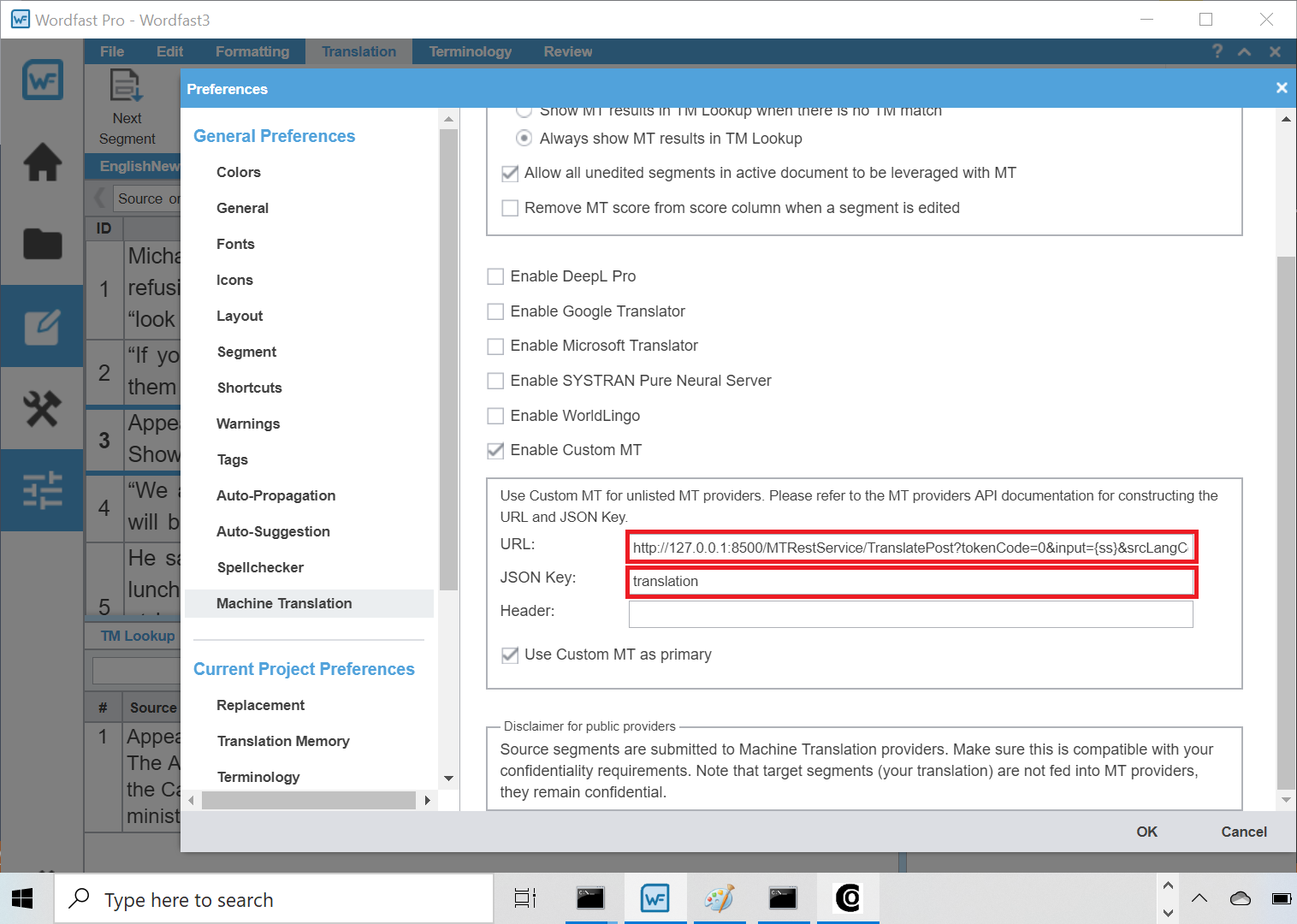
The value of the URL should have the following format:
http://localhost:8500/MTRestService/TranslatePost?tokenCode=0&input={ss}&srcLangCode=en&trgLangCode=fi&modelTag=
NOTE: The srcLangCode and trgLangCode values in the URL should be replaced with the two-letter codes of the source and target language of the project. So if the source language of the project is e.g. French and the target language English, the URL should be the following:
http://localhost:8500/MTRestService/TranslatePost?tokenCode=0&input={ss}&srcLangCode=fr&trgLangCode=en&modelTag=
Other versions of Wordfast support inserting the project’s source and target language automatically into Custom MT URLs, but for some reason Wordfast Pro does not. Machine translations are generated only if a machine translation model has been installed for the specified language pair. You can check installed models from the Models tab of OPUS-CAT MT Engine.
When you have entered the values to the URL and JSON Key fields, close the Preferences window by clicking *OK, and open a file in the editor. The OPUS-CAT machine translation should now be displayed when a segment is opened:
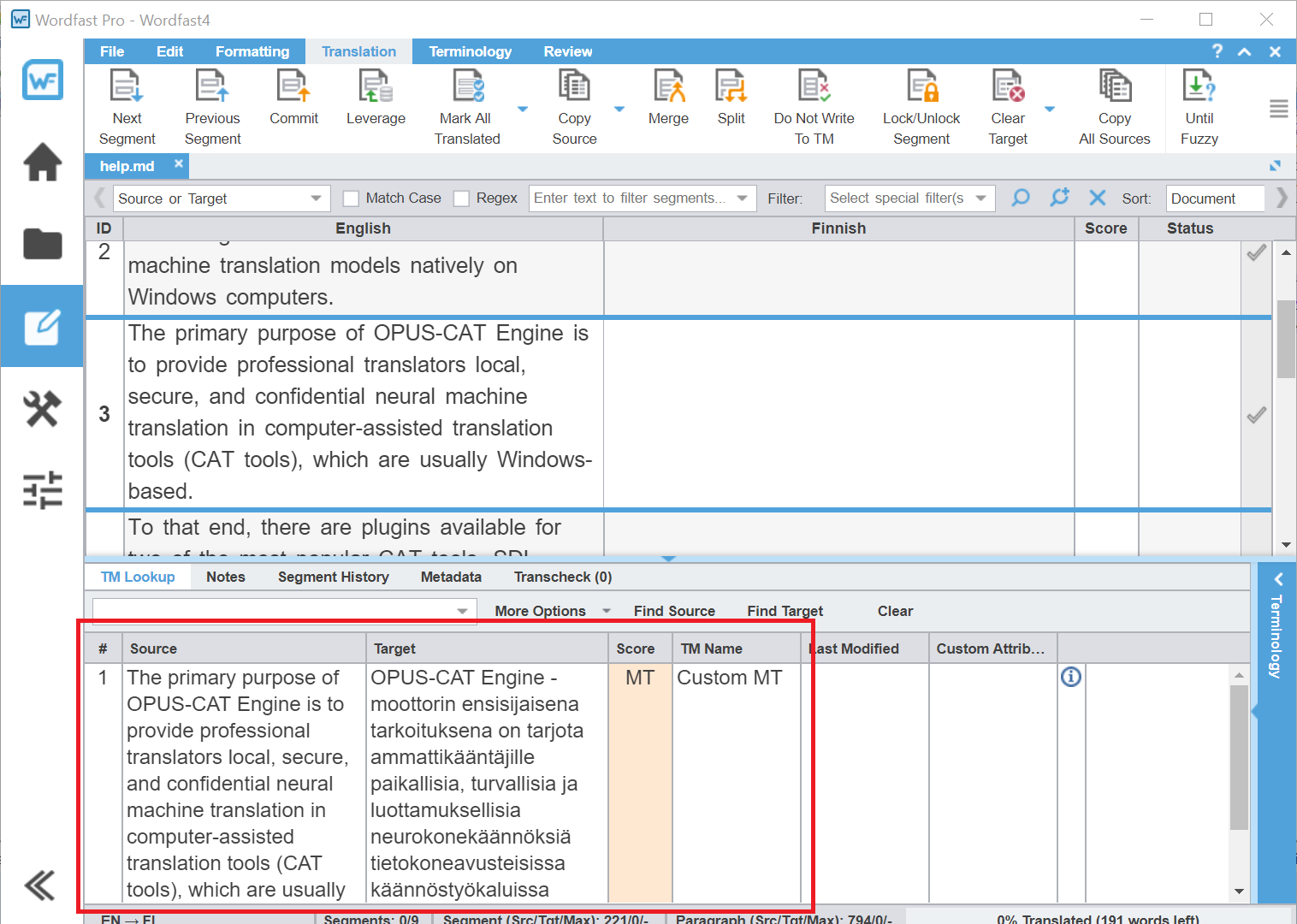
The appearance of the first machine translation may take some time, as the MT model has to be initialized. Later translations will be produced faster. Machine translations can also be pregenerated for all segments by selecting the Use primary MT on no match segments checkbox in the project creation wizard:
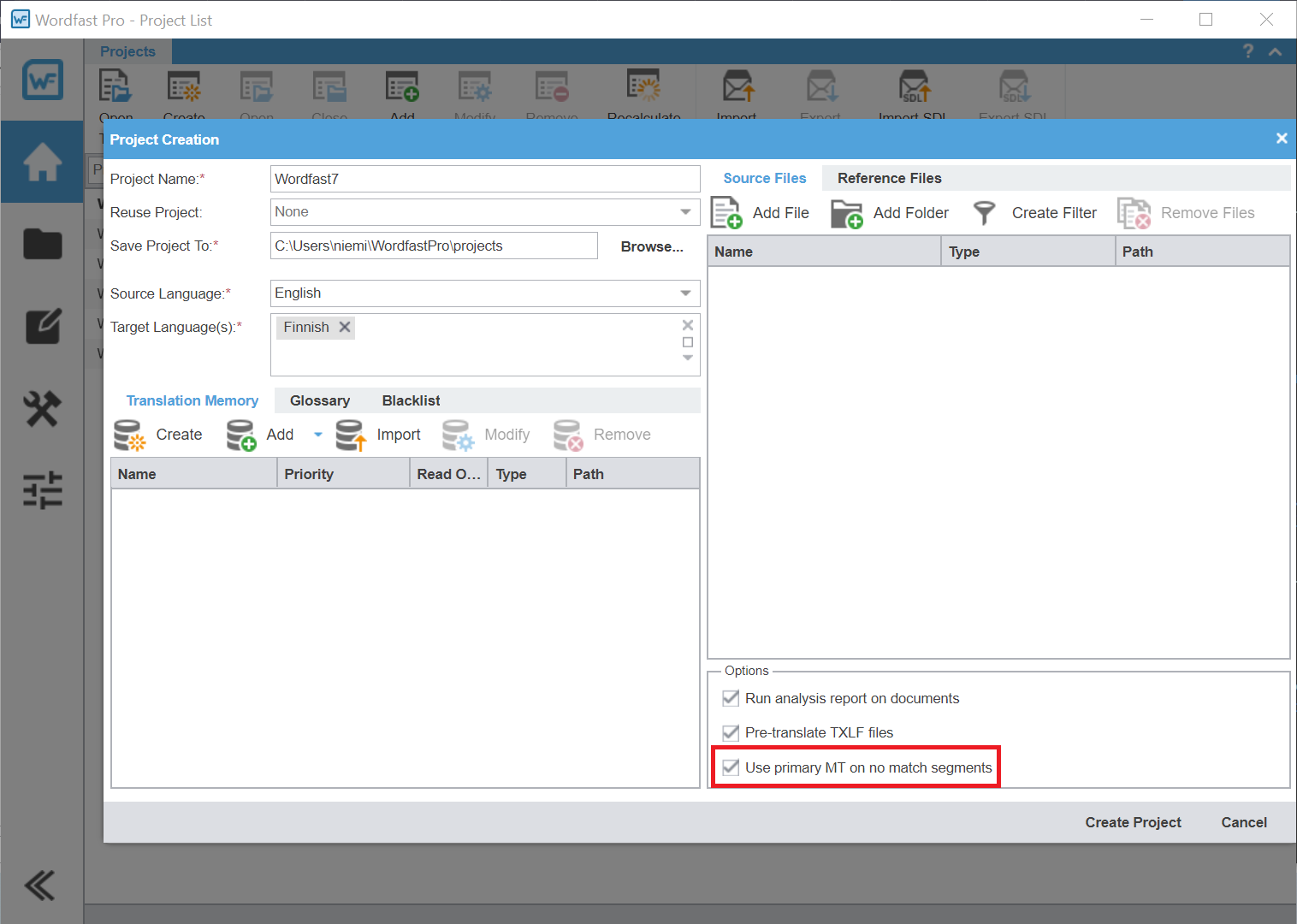
Make sure to set Custom MT as the primary MT in the preferences before using this option.
Using OPUS-CAT in Wordfast Classic
Note: These instructions are for the current version of Wordfast Classic (8.85), courtesy of Jamie Lucero. Instructions for older versions of Wordfast Classic are available here.
- Make sure that OPUS-CAT MT Engine is running.
- Open Wordfast Classic user interface by pressing Ctlr+Alt+W in Word and select the Machine translation tab and the Customize MT subtab, and then select the MT name dropdown and choose Custom (add):
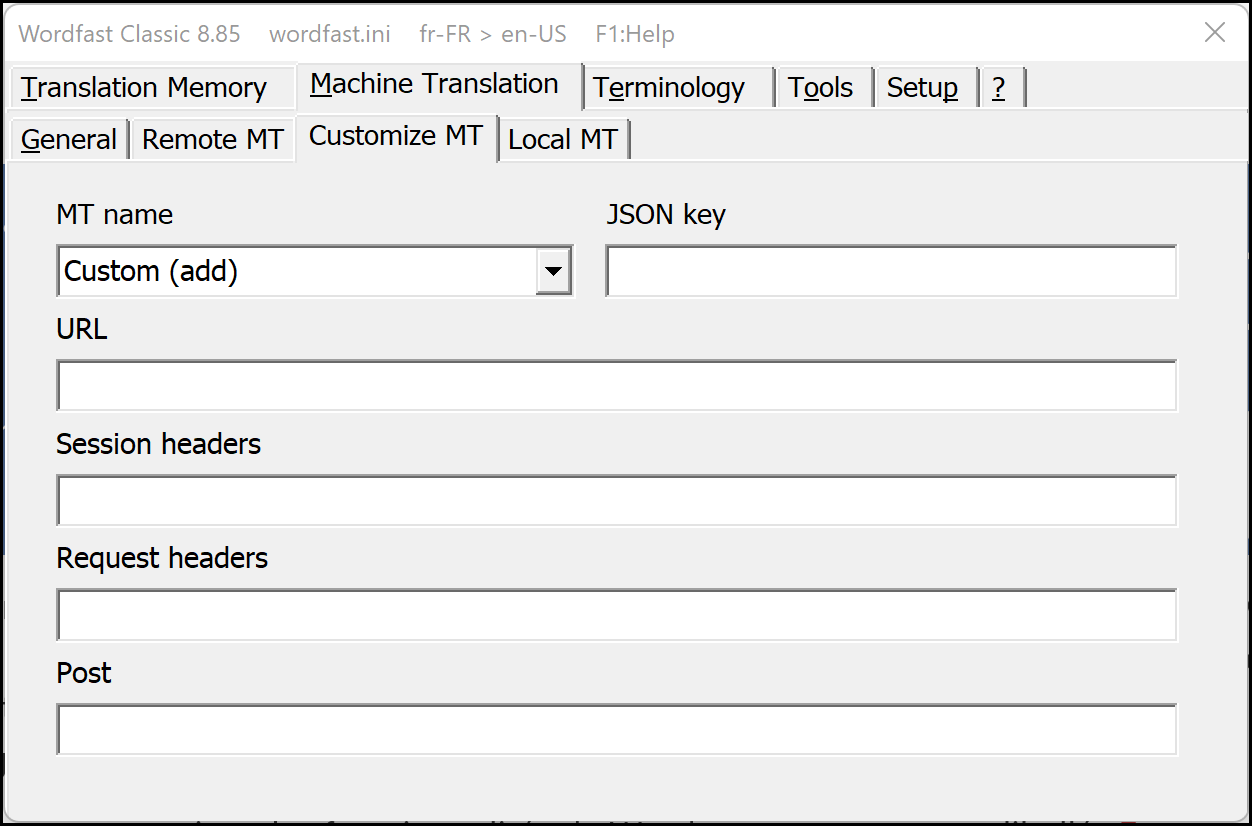
- Provide a preferred name, add the JSON key and URL (use the URL value below), and click Remote MT tab (or another tab) to initiate the save changes dialog:
http://localhost:8500/MTRestService/TranslateJson?tokenCode=&input={ss}&srcLangCode={sl}&trgLangCode={tl}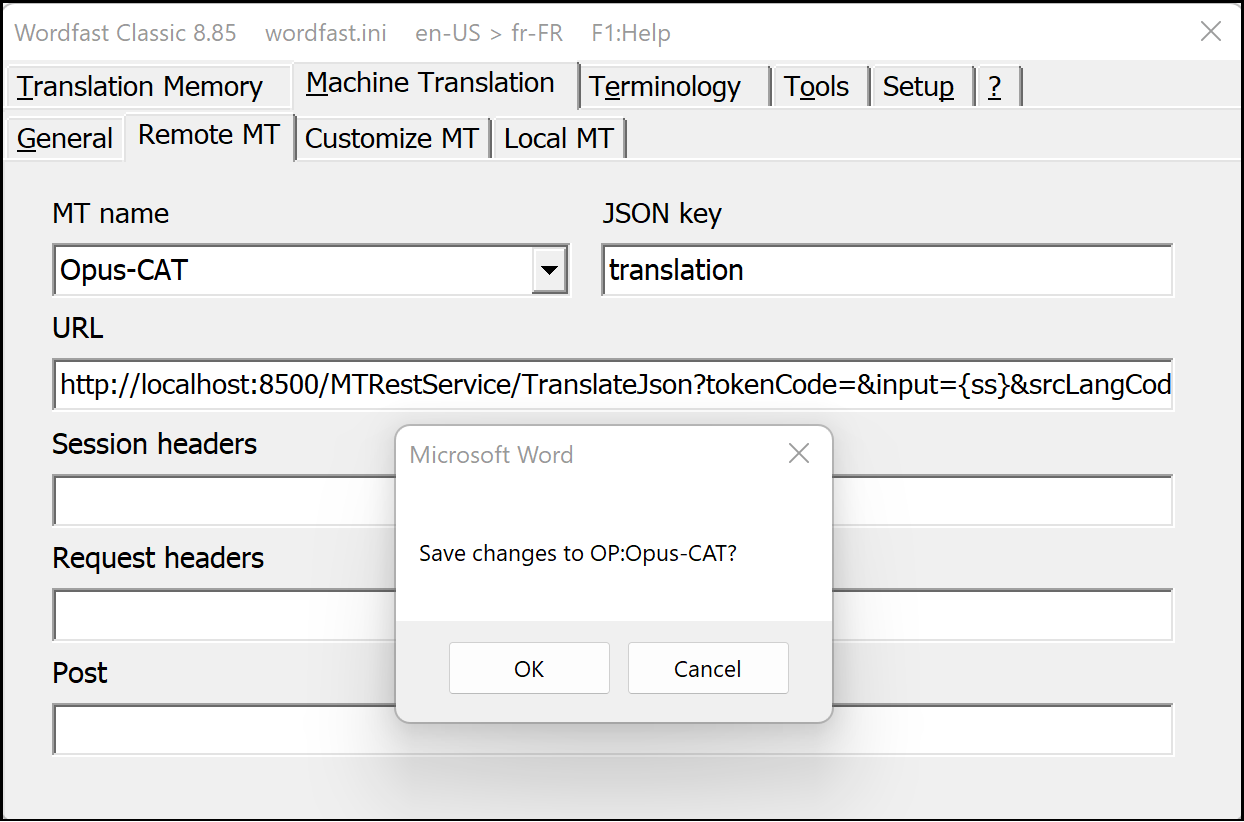
- After saving, select the new connection from the MT provider dropdown:
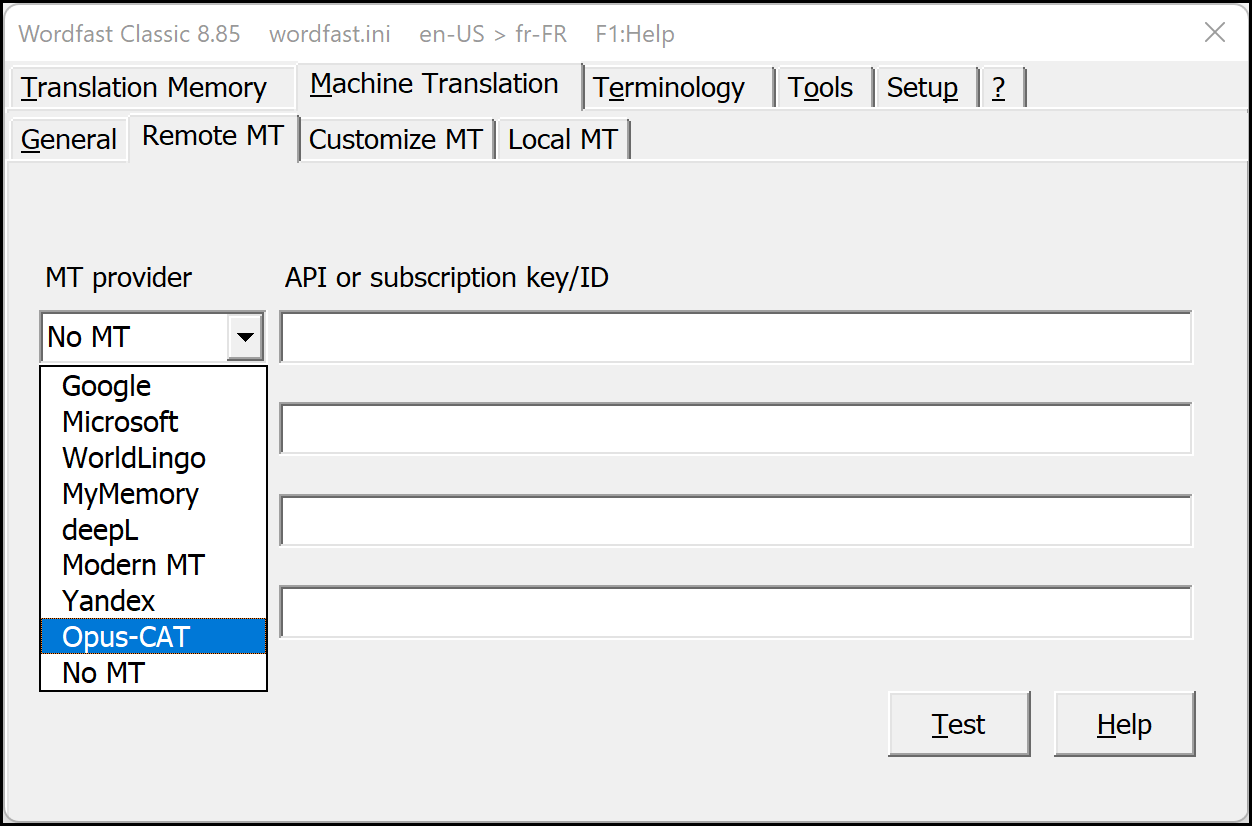
- You can now test OPUS-CAT by clicking the Test
button. If the test produced a translation, close the Wordfast Classic
user interface and open some source file. When you now open a segment,
Wordfast Classic should display a machine translation from OPUS-CAT
(unless a TM match is available):
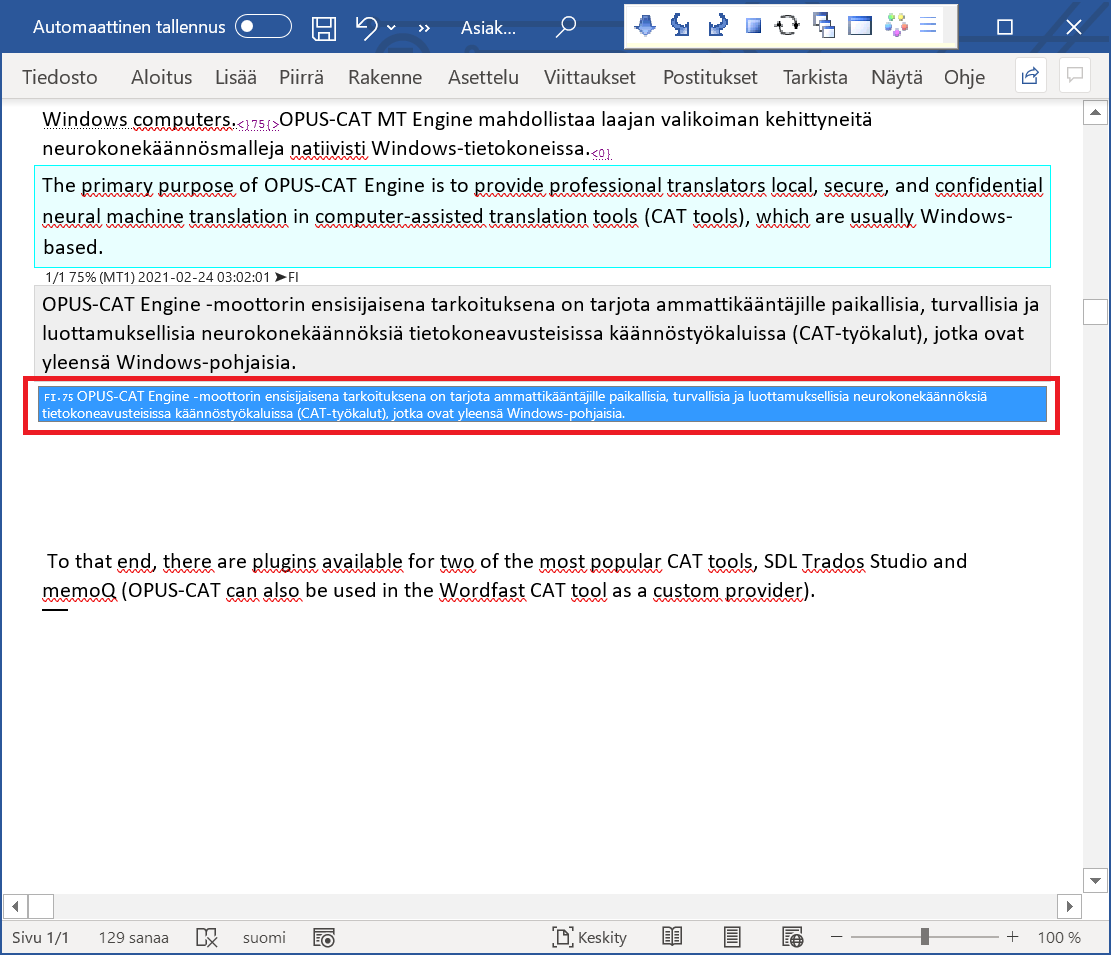
Using OPUS-CAT with Wordfast Server
These instructions are also courtesy of Jamie Lucero. With Wordfast Server and Opus-CAT running on the same machine, Opus-CAT can be used from outside the LAN with a connection to Wordfast Server.
- Go to Setup and click MT Engines to add the MT Name and configure the rest:
URL: http://localhost:8500/MTRestService/TranslateJson
Request data: tokenCode=&input={ss}&srcLangCode={sl}&trgLangCode={tl}&modelTag=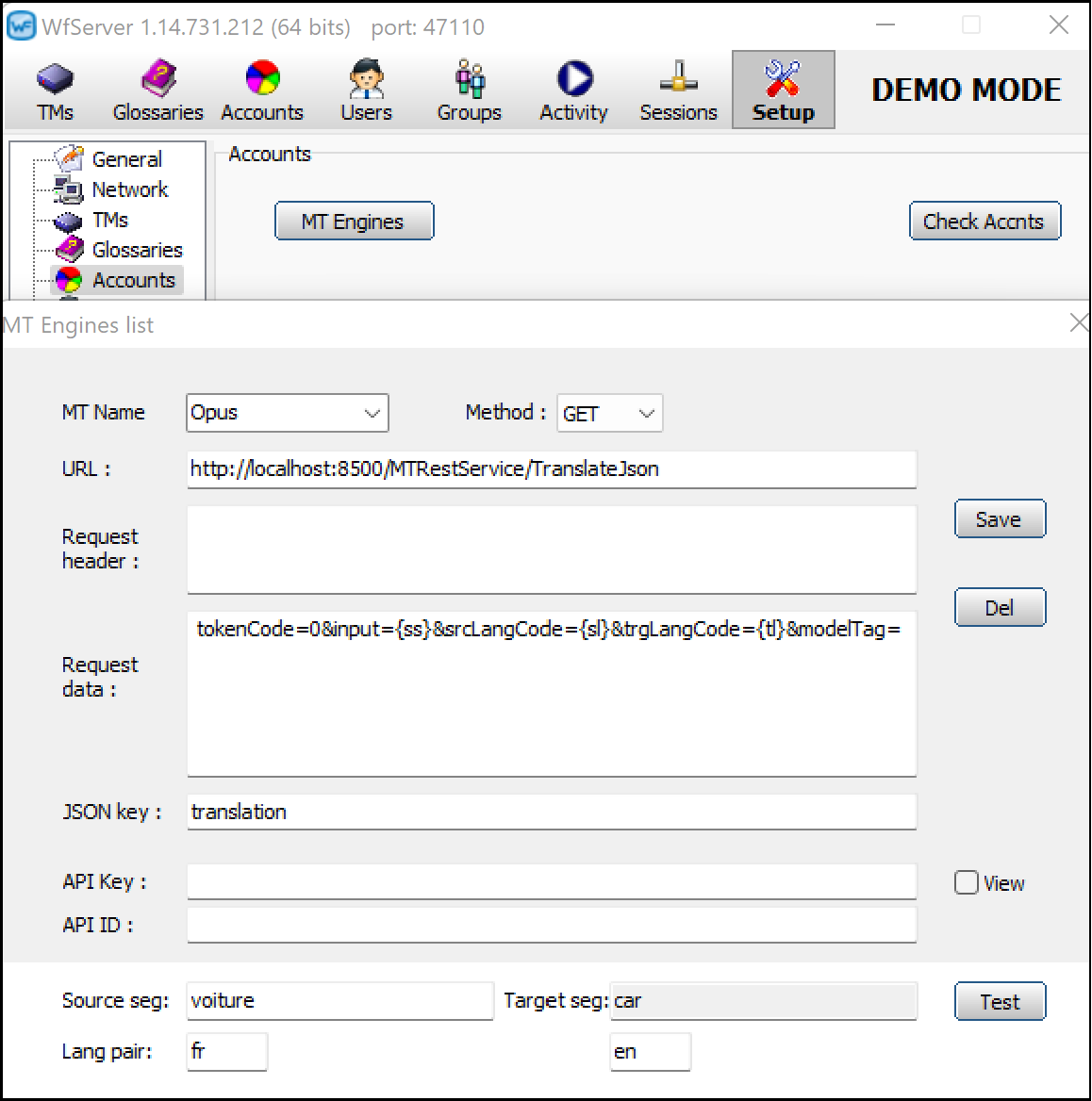
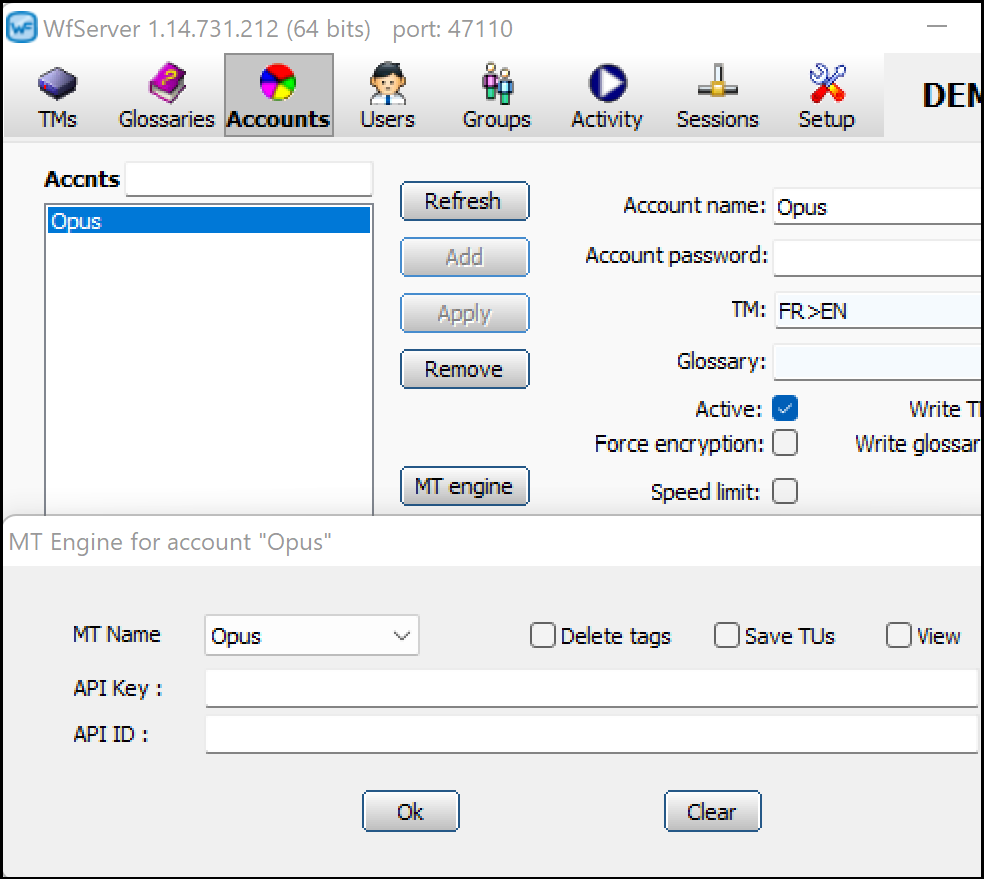
- Under Accounts, set up a new account or choose an existing one, then click the MT engine button to open the dialog and choose the desired engine:


 Posts
Posts


